Android App Distribution is Changing in 2026: Are Your APK and Enterprise Rollout Plans Still Safe?
Android app distribution is no longer only a release pipeline issue.
The shift comes from Google’s Android developer verification rollout, first announced in August 2025 and moving into enforcement across 2026 and 2027. Starting September 2026, apps in select regions must be registered by a verified developer to install on certified Android devices. This applies across all distribution routes, including Google Play, third-party stores, and direct APK downloads.
For enterprises, that changes how Android apps are built, distributed, and supported. Verification now touches nearly every stage of that lifecycle, which means app ownership, device governance, vendor control, mobile app security, and back-end trust can’t stay implicit.
APK distribution is where this plays out most concretely. They are not going away; they still matter for enterprise fleets, private apps, rugged devices, testing workflows, and specialized rollout models. But unmanaged APK distribution now creates more risk around verification, version control, signing ownership, and auditability.
The key question is practical: Can your business install, update, verify, and govern every Android app it depends on?
What is Changing in Android Distribution?
Android apps reach users through Google Play, third-party stores, company websites, direct APK downloads, and private enterprise channels. This wide omnichannel distribution surface also increases security and accountability risk.
Google has reported over 50 times as much Android malware from internet sideloading sources as from apps available through Google Play. Since this is based on Google’s own analysis, enterprises must treat it as a directional risk signal.
The Android Developer Verification Program (ADVP) addresses this by requiring apps to be tied to a verified developer identity, rather than an anonymous or unverified publisher. From September 30, 2026, app registration will be required for installs and updates on certified Android devices in Brazil, Indonesia, Singapore, and Thailand. Global expansion is planned from 2027 onward. The first phase also includes stores beyond Google Play, including Galaxy Store, HONOR App Market, OPPO App Market, Palm Store, vivo V-Appstore, and Xiaomi GetApps.
One enterprise exception matters. Apps distributed through an organization’s own store on managed devices do not need verification because IT admins have already vetted them. Still, enterprises should register apps that may later move outside managed environments or run on non-managed devices.
For enterprise Android portfolios, apps outside controlled managed channels may need verified developer identity, registered package names, signing-key control, and clearer rollout ownership.
APKs are Still Relevant, But the Rollout Model Must Change
APKs still continue to support real enterprise needs. They are useful for MDM (Mobile Device Management) deployments, rugged devices, dedicated devices, OEM-specific builds, private infrastructure, testing workflows, and controlled internal apps. The issue only begins when APKs move without governance. Email attachments, shared drives, private links, and messaging apps weaken visibility. They also make version control harder.
Common risks include:
- Field users may keep outdated builds.
- Modified APKs may reach employees or partners.
- Support teams may troubleshoot unknown versions.
- Security teams may lack deployment audit trails.
- Regional teams may bypass approved channels.
Android App Bundles add another layer to the packaging decision. Since August 2021, Google Play has required new apps to be submitted as Android App Bundles (AABs). An app bundle defers APK generation and signing to Google Play. Google Play then serves optimized APKs for each device configuration. That makes AABs the default route for Play-led distribution.
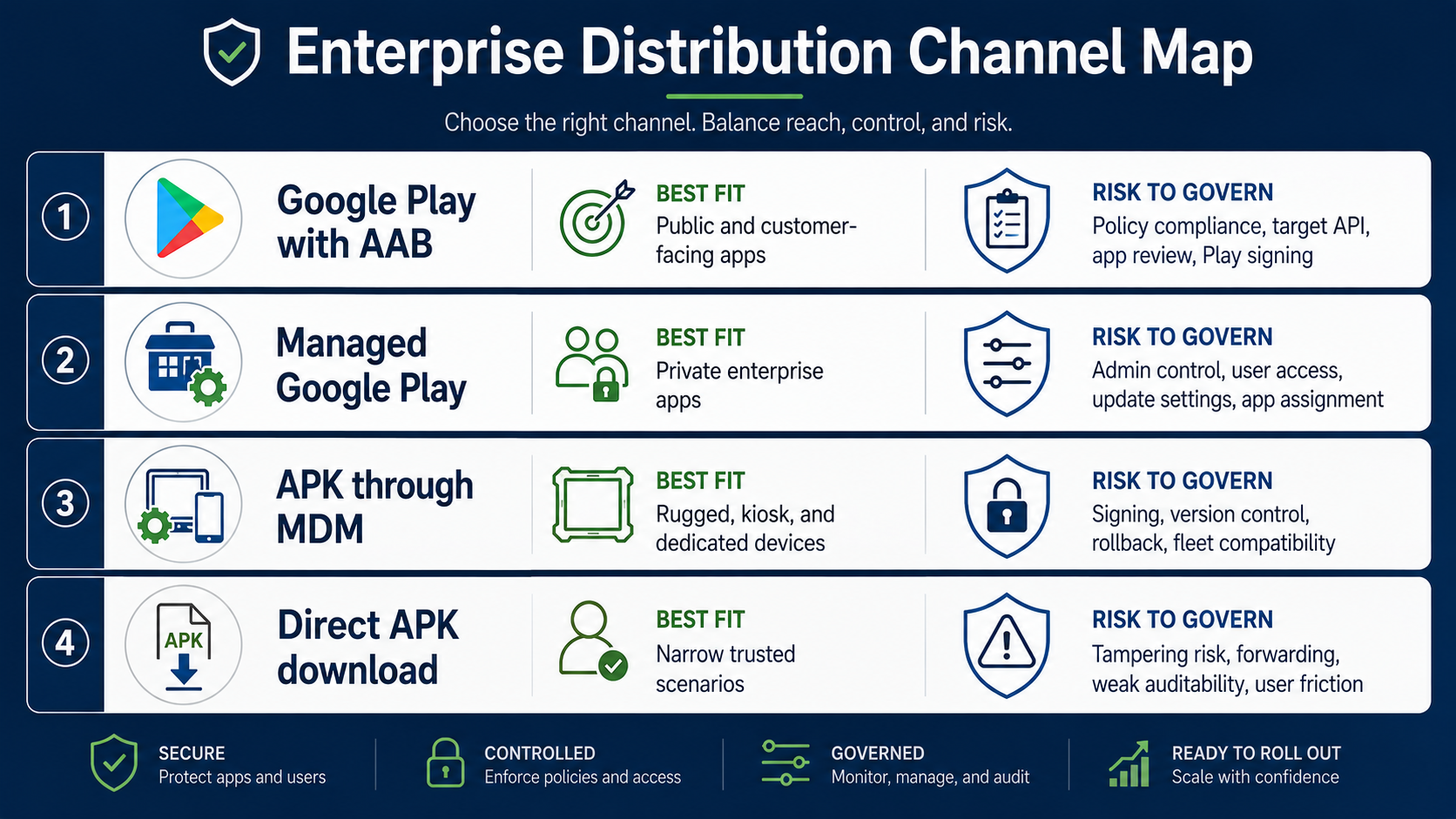
The decision should be based on channel risk.
| Distribution Route | Best Fit | What Leaders Must Govern |
| Google Play with AAB | Public and customer-facing apps | Policy compliance, target API, app review, Play signing |
| Managed Google Play | Private enterprise apps | Admin control, user access, update settings, app assignment |
| APK through MDM | Rugged, kiosk, and dedicated devices | Signing, version control, rollback, fleet compatibility |
| Direct APK download | Narrow trusted scenarios | Tampering risk, forwarding, weak auditability, and user friction |
There is also a technical trap. Partial installs of sideloaded apps can fail when the required split APKs are missing. This applies to all Google-certified devices and Android 10 or higher. For enterprise portfolios, packaging decisions should happen earlier. They should be planned during the mobile app development, when the mobile app architecture, signing, distribution channels, and update paths are still being defined.
App Ownership and Rollout Channels Need Clear Governance
Android package names, signing keys, developer accounts, and rollout channels now carry a business risk. Together, they determine whether an app can be updated, transferred, verified, deployed, and trusted.
- A package name connects to the app’s installed base, backend integrations, analytics, deep links, app links, and brand presence. If that package is controlled by the wrong account, continuity becomes harder as transferring it later requires a formal app transfer request during vendor transitions, audits, acquisitions, or product carve-outs.
- Signing keys create another critical dependency. Android uses cryptographic signing keys to confirm that updates come from the same trusted source. A lost or compromised key can block updates, throwing a SIGNATURE_MISMATCH error because the OS thinks the update is a malicious hijacking attempt.
- The same governance discipline should extend to rollout channels. Manual APK delivery does not scale across enterprise Android environments. Managed Google Play, Android Enterprise, and MDM or EMM platforms give IT teams stronger control over who gets an app, when updates install, and which devices remain compliant.
Google Workspace supports private Android apps in Managed Google Play. Admins can publish private apps using an AAB or APK, control access, force installs, manage update timing, and use testing tracks.
Based on the above, a mature Android rollout plan should clearly define the following:
- Play Console and Android Developer Console access
- Package name registration and transfer rights
- Upload keys, app signing keys, and keystore custody
- Vendor contracts, exit clauses, and source code control
- Device model, such as BYOD, COPE, COBO, or dedicated
- App assignment by group, device, role, region, or business unit
- Update priority, test tracks, and maintenance windows
- Permission approval, uninstall behavior, and rollback paths
When enterprises engage internal teams or external development partners for Android modernization, contracts should cover signing custody, package ownership, account transfer, and release responsibility.
This reduces dependency on vendors, local admins, individual users, and informal support processes. It also turns Android distribution into a controlled enterprise function, not an ad hoc release activity.
Technical Blockers Can Still Break a Governed Rollout
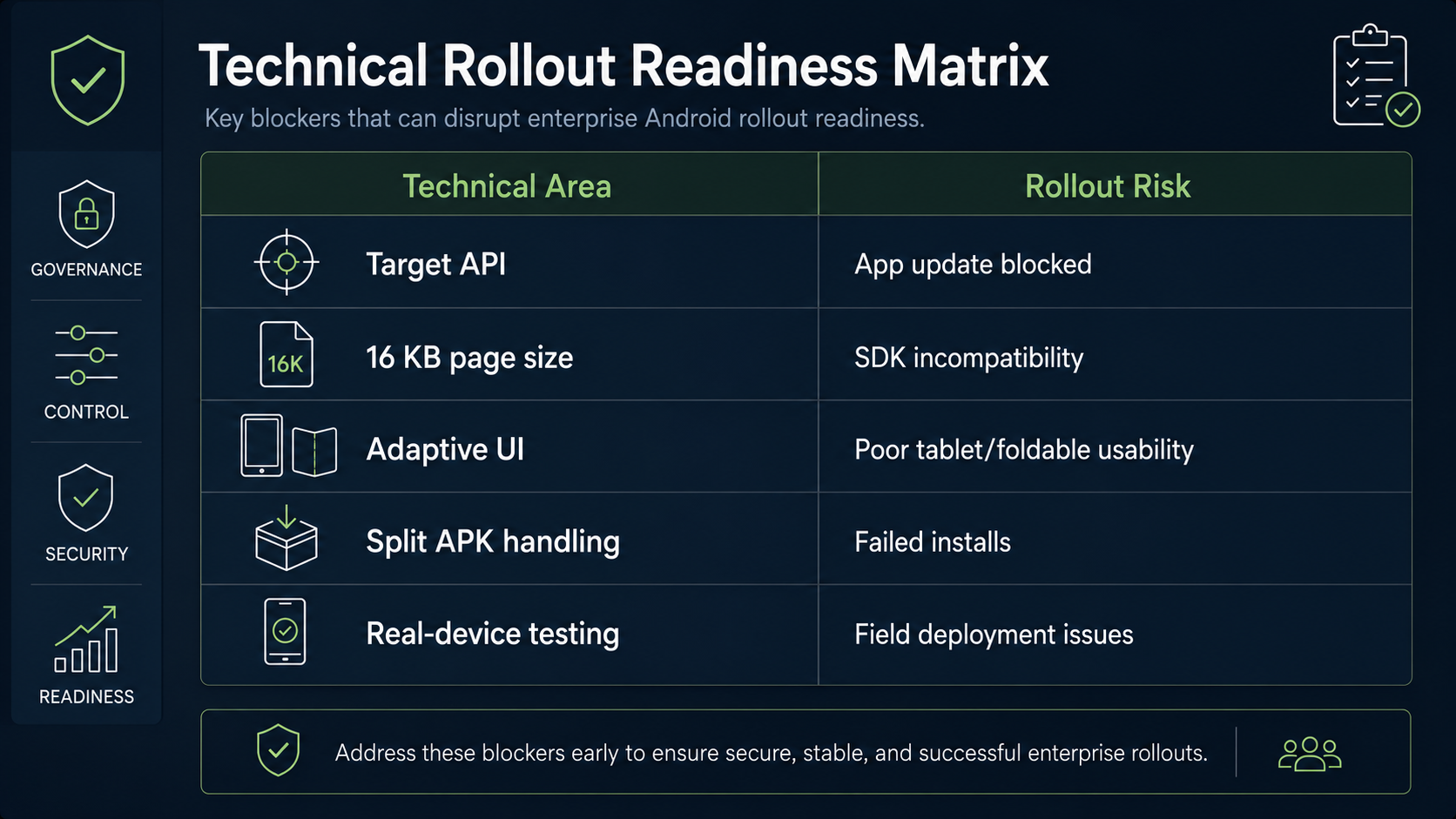
Governed channels reduce distribution risk. But they do not remove technical release risks. An app can pass functional QA and still fail rollout readiness as target API gaps, SDK issues, page-size compatibility, and adaptive UI gaps can delay deployment. These blockers show why Android app modernization should also account for release engineering, mobile app testing, SDK audits, and real-device validation.
Target API Compliance Can Block Updates
Since August 31, 2025, Google Play has required new apps and updates to target Android 15, API level 35, or higher. Existing apps must continue to target Android 14, API level 34, or higher to remain available to new users on newer Android versions.
This deadline has already passed. It is now a current release gate.
Target API upgrades can change app behavior across permissions, notifications, storage, background services, connectivity, and security controls. For enterprise apps, delayed target API work can block updates. It can also force rushed modernization before release. Google lists an exception for permanently private apps restricted to a specific organization. These apps must be intended only for internal distribution. That exception is useful, but it should not delay mobile app modernization.
Apps often move beyond their original scope. They may later support partners, contractors, customers, or regional teams.
16 KB Page-Size Support Can Expose Hidden SDK Risk
Since November 1, 2025, Google Play has required 16 KB page-size support for certain apps. The rule applies to new apps and updates targeting Android 15+ devices on 64-bit hardware. Google says apps that use NDK libraries need to be rebuilt for 16 KB devices. This applies whether native code is used directly or through an SDK. This risk is easy to miss. Native code often sits within external SDKs rather than custom C++ code.
Common risk areas include:
- Payment SDKs
- Analytics SDKs
- Biometric modules
- Camera and scanning libraries
- Mapping SDKs
- DRM and media components
- Anti-fraud and security SDKs
- React Native or Flutter native plugins
One outdated SDK can delay rollout readiness across several Android apps. Google also cites performance gains from 16 KB devices. Its testing showed lower launch times, reduced launch power draw, faster camera startup, and shorter boot times. So this requirement is not only a compliance item. It also affects performance planning for future devices.
Adaptive Readiness is Now an Enterprise Device Requirement
Large-screen behavior is changing across Android. Android 17 removes the opt-out for orientation, resizability, and aspect ratio restrictions on large screens. This applies to apps targeting API level 37 or higher. Enterprise Android usage is no longer phone-only.
Google says developers can reach more than 580 million large-screen Android devices. This includes tablets, foldables, ChromeOS, cars, and XR form factors. For B2B apps, adaptive readiness affects more than UI quality. It affects sales apps, healthcare tools, warehouse apps, field apps, and executive dashboards. Poor resizing, locked orientation, or awkward tablet layouts can break workflow usability.
What This Means for Release Readiness
Release readiness now needs more than functional testing. Before rollout, enterprises should validate target API compliance, 16 KB support, native SDK readiness, adaptive layouts, split APK handling, and real-device performance. The goal is to keep apps installable, updateable, stable, and usable across every enterprise device group.
App Integrity Must Be Part of Distribution Strategy
Installation control does not prove runtime trust. Enterprises also need to know whether backend requests come from a genuine app on a trusted device. The Play Integrity API helps check whether user actions and server requests come from the genuine app. It also checks whether the app was installed by Google Play and runs on a genuine certified Android device.
Google says the API can detect risky interactions. These include tampered app versions, untrustworthy devices, and emulated environments. For enterprise teams, app integrity should be part of mobile app security. It connects app distribution, device posture, and backend access control. This matters when apps support sensitive workflows.
Examples include:
- Banking transactions
- Digital identity
- Insurance claims
- Inventory updates
- Delivery proof
- Field check-ins
- Healthcare data access
- Loyalty and coupon redemption
For private enterprise apps, Play Integrity may need supporting controls.
Those controls include MDM compliance signals, device posture checks, signed requests, certificate pinning, and risk-based access. The goal is a measured response. Low-risk activity can proceed, while sensitive actions require stronger checks.
What CXOs Should Audit Before 2026 Enforcement
The audit should start with the Android portfolio, not with a single app. First, map each Android app by business function, audience, device type, region, and distribution channel.
Then assess three control areas.
1. Distribution and Device Scope
- Identify public apps, private apps, partner apps, and internal apps.
- Separate apps are distributed through Google Play, Managed Google Play, MDM, third-party stores, and direct APK links.
- Flag exposure in Brazil, Indonesia, Singapore, and Thailand. Also, plan for global expansion from 2027.
2. Ownership and Release Control
- Confirm developer account ownership, package name registration, signing key custody, and app transfer rights.
- Review vendor agreements for source code access, signing control, and exit support.
- Check whether critical apps depend on unmanaged individuals, legacy accounts, or vendor-controlled credentials.
This is especially important in custom mobile app development projects handled by multiple vendors or regional teams.
3. Technical and Security Readiness
- Validate target API compliance, 16 KB compatibility, SDK readiness, adaptive layouts, and real-device behavior.
- Review app integrity controls for high-risk workflows.
- Confirm that MDM or EMM tools can track install status, app version, update behavior, and policy compliance.
This audit should involve technology, security, legal, procurement, and operations. Android distribution now cuts across enterprise app development, vendor governance, and security operations.
Final Takeaway
APKs remain important for enterprise fleets, private apps, rugged devices, testing environments, and specialized rollouts. The risk comes from unmanaged APK distribution, unclear ownership, outdated platform readiness, and weak runtime trust.
In 2026, Android rollout safety depends on four controls. First, verify who owns the app identity. Second, govern how the app reaches each device group. Third, keep the app technically ready for current Android standards. Fourth, connect distribution trust with backend security. C-suite leaders should treat Android distribution as an operating control. It is now part of mobile app development governance, not only a file delivery process.