How to Migrate Legacy B2B Systems to Flutter for AI Readiness
McKinsey found that 70% of Fortune 500 organizations use software developed 20 or more years ago, despite growing pressure to modernize their technology environments. This becomes increasingly important as businesses adopt AI and other advanced capabilities that legacy systems struggle to support because of outdated architectures, integrations, and infrastructure.
The same pressure applies to organizations exploring how to migrate a legacy system to multi-platform frameworks like Flutter without significant downtime. Their modernization strategy should focus on creating a more flexible application foundation without disrupting existing B2B operations. A phased approach can preserve back-end systems and business logic while progressively introducing new capabilities. The sections ahead provide a step-by-step guide to near-zero-downtime Flutter migration, along with common migration mistakes and ways to avoid them.
Step-by-Step Process to Migrate Legacy Systems to Flutter
Migrating a legacy B2B system to Flutter requires a structured approach to reduce risks and maintain business continuity. The following steps outline the key stages of planning and executing a successful Flutter migration.
Step 1: Assess the Existing Application Architecture
Before beginning migration, the engineering team needs to understand the current system landscape. The initial assessment helps define the migration approach.
- Review application workflows, user journeys, and business-critical processes.
- Assess whether existing frontend technologies, backend services, databases, APIs, and application services can support future AI capabilities.
- Identify legacy components that could restrict AI integration, real-time data access, or model connectivity.
Step 2: Define Migration Scope and Prioritize Modules
A clear migration scope helps teams decide where to begin and how to structure the legacy modernization journey. The following factors help determine migration priorities.
- Identify modules based on business importance, technical complexity, and user impact.
- Prioritize frequently used workflows and high-value application features.
- Select components with stable APIs and manageable dependencies for initial migration.
- Create migration phases, timelines, and implementation milestones.
Step 3: Select the Right Legacy Migration Strategy
To choose the right legacy migration strategy, Flutter app developers can consider the following approaches based on their requirements:
- Use incremental migration to replace legacy features gradually while keeping existing systems operational.
- Implement Flutter add-to-app to introduce Flutter modules into existing native applications.
- Consider complete application redevelopment when the existing architecture limits future growth.
- Evaluate migration complexity, available resources, and long-term maintenance requirements.
Step 4: Establish an API and Integration Layer
A modern integration layer should do more than connect the Flutter application with existing enterprise systems. It should create well-defined interfaces through which future AI services, models, and applications can securely access approved business capabilities and data.
- Review existing APIs and identify integration gaps, bottlenecks, and legacy dependencies.
- Use REST APIs, GraphQL, or backend-for-frontend layers where appropriate.
- Establish secure, well-defined interfaces for application data and business operations.
- Design APIs with consistent contracts that can support future AI services and model integrations.
Step 5: Migrate Features Incrementally
Migrating individual features lets teams introduce Flutter gradually while reducing operational risk. A phased approach helps validate each implementation before expanding further.
- Select modules based on migration readiness and business priority.
- Develop Flutter versions of selected features.
- Connect migrated modules with existing backend services.
- Test functionality with users before broader deployment.
Step 6: Establish Data, Security, and Governance
Running legacy and Flutter applications together requires reliable data and security controls. These foundations also become important when the modernized system later begins supporting AI features and models.
- Define data ownership, synchronization methods, and validation rules across old and new systems.
- Establish consistent data structures and access patterns for modernized application modules.
- Implement authentication, authorization, encryption, and access controls.
- Plan offline data storage, synchronization, and conflict resolution where required.
- Define governance requirements for data that AI services may later access.
Step 7: Prepare the Modernized System for AI
Once the required application capabilities have migrated and been validated, the modernized architecture can become the foundation for AI-enabled expansion. At this stage, the focus shifts from replacing legacy components to making application data, services, and workflows accessible to AI systems in a controlled way.
- Retire legacy components only after the dependencies are fully migrated and validated.
- Establish governed access to the structured data AI features and models require.
- Expose approved application capabilities through APIs or services that AI systems can securely consume.
- Add observability, logging, and evaluation mechanisms for AI-enabled workflows.
- Introduce AI features incrementally, starting with use cases that have clear business value and measurable outcomes.
Common Pitfalls and How to Avoid Them
Digital transformation can fail even when the technical implementation is sound if teams overlook operational dependencies and transition challenges. Identifying these risks early helps developers create a migration process that supports continuity, reduces rework, and maintains application reliability throughout the modernization journey.
1. Underestimating Data Synchronization Complexity
Data synchronization is one of the most critical aspects of migrating enterprise applications because legacy and Flutter systems often operate together during transition. Flutter developers who focus mainly on rebuilding the interface may later discover inconsistencies when both systems access, update, or process the same data. To avoid synchronization issues:
- Define data ownership, update flows, and synchronization rules before migrating individual modules.
- Plan conflict resolution, validation checks, and error-handling mechanisms.
- Test data consistency between legacy and Flutter environments throughout migration phases.
2. Migrating High-Traffic Modules First
The most visible or frequently used features are not always the best starting points for legacy migration. Beginning with complex, business-critical modules can increase pressure on development teams and expose unresolved architecture issues early. Therefore, a safer approach is to:
- Start with smaller, lower-risk modules that have limited dependencies.
- Use early migration phases to validate Flutter architecture, APIs, and deployment workflows.
- Apply lessons from early modules before moving to larger, more complex features.
3. Relying on a Single Rollback Plan
A common mistake is creating one application-wide rollback strategy instead of preparing recovery plans for individual migrated modules. To avoid this:
- Define a rollback process for every migrated module before production deployment.
- Test rollback scenarios during staging and controlled releases.
- Maintain independent deployment paths for legacy and Flutter components.
4. Overlooking Session and State Management
During phased migration, users may move between legacy screens and Flutter-based screens within the same workflow. Without proper state handling, this transition can create inconsistent sessions, lost inputs, or interrupted user journeys. Therefore, Flutter developers should:
- Maintain consistent authentication and session management across both environments.
- Define how user states, preferences, and workflow progress are transferred between systems.
- Test cross-application navigation scenarios before production rollout.
Final Thoughts
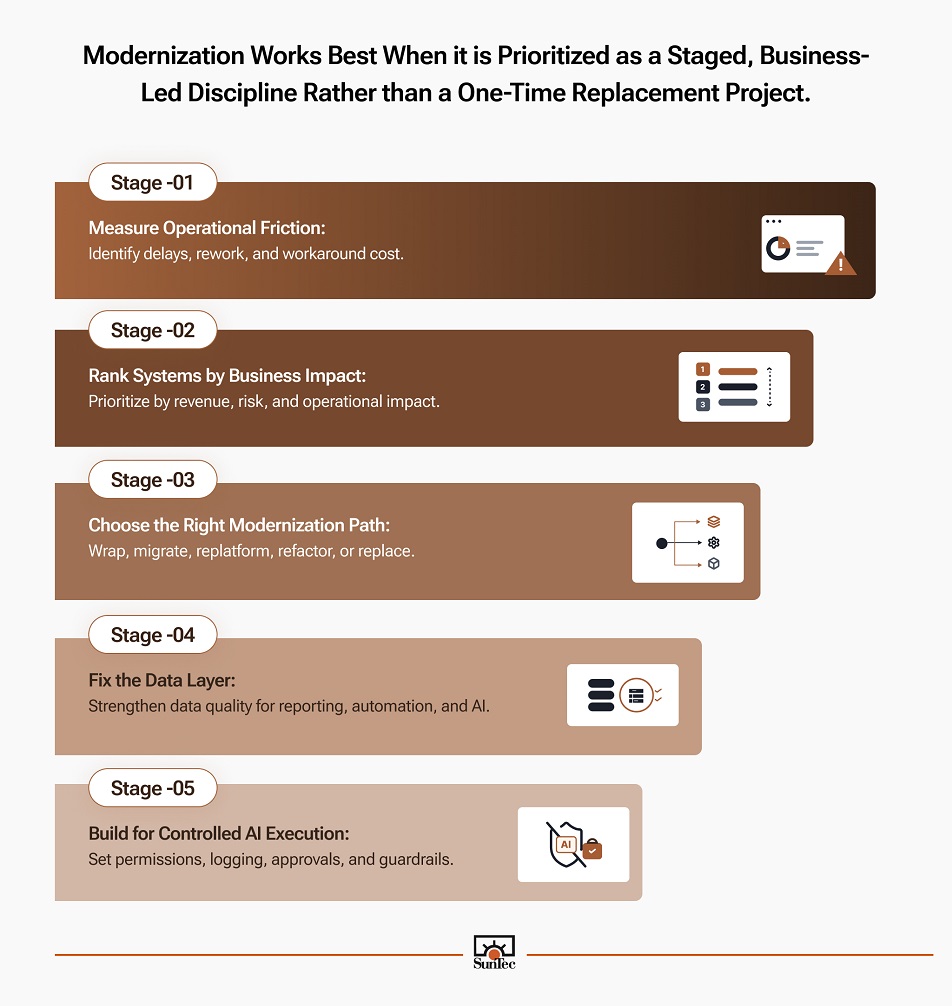
Migrating a legacy B2B system to Flutter should be viewed as a modernization step toward a more capable application environment, not simply a frontend replacement. A well-planned migration can separate the application layer from legacy constraints while creating cleaner APIs, accessible data flows, and a more maintainable architecture.
This foundation becomes increasingly valuable as organizations introduce Agentic and Gen AI-powered features, services, and models into their applications. By modernizing incrementally and preparing data, integrations, and application services for future AI requirements, teams can pursue legacy modernization that supports both immediate business needs and longer-term digital transformation without disrupting critical operations.