

Speed, Personalization, and Simplicity: The Future of Web Development
Introduction
Whenever a new web development project is about to start, most leaders naturally start by talking about tech stack. It goes in a way that everyone gathers in a room to debate the front-end framework, where to host it, which database architecture to use, and how to lock down the security and deployment pipelines. These decisions definitely matter, as they form the bones of your project and have a serious impact on scalability and maintainability. But these things alone are not the sole drivers of revenue and performance.
Even with heavy investment in the modern web development frameworks, plenty of organizations still face high bounce rates (typically 40%-60%) and customer churn (estimated performance and revenue usually don’t show up on an architecture diagram. They show up in how quickly a web page opens, how smooth navigation is, whether it meets the visitor’s actual needs, and the overall experience.
In this blog, we are going to see modern web design trends that are shaping the future of web development in 2026 and beyond. It explains why these factors matter, offers quick tips for implementing them in your next website build or redesign, and some of the emerging companies to hire web developers.
Modern Web Design Trends Pillaring the Future of Web Development in 2026
Pillar 1: Speed is Critical for Web Pages
Web page loading speed has become so crucial that it is no longer a technical requirement, but a commercial safeguard to retain customers and preserve brand credibility. Users now make decisions in seconds even a 2-second delay in a website’s page load may cost you 4.3% revenue loss per visitor.
It doesn’t end here. Slow web pages damage more than the user experience (UX). They weaken business performance across the full customer journey. When landing pages load slowly, paid campaigns become less efficient because visitors leave before converting. Slow product pages also limit product exploration. Delays in filters and search results make discovery harder, especially in large catalogs. Slow checkout flows increase cart abandonment, while sluggish forms reduce lead submissions.
On the other hand, fast loading websites enhance customer trust and signal reliability. Even a 0.1-second speed improvement can improve progression rates across the purchase journey. A retail brand increased conversions by 8.4% and average order value (AOV) by 9.2% with a small 0.1-second improvement in mobile site speed.
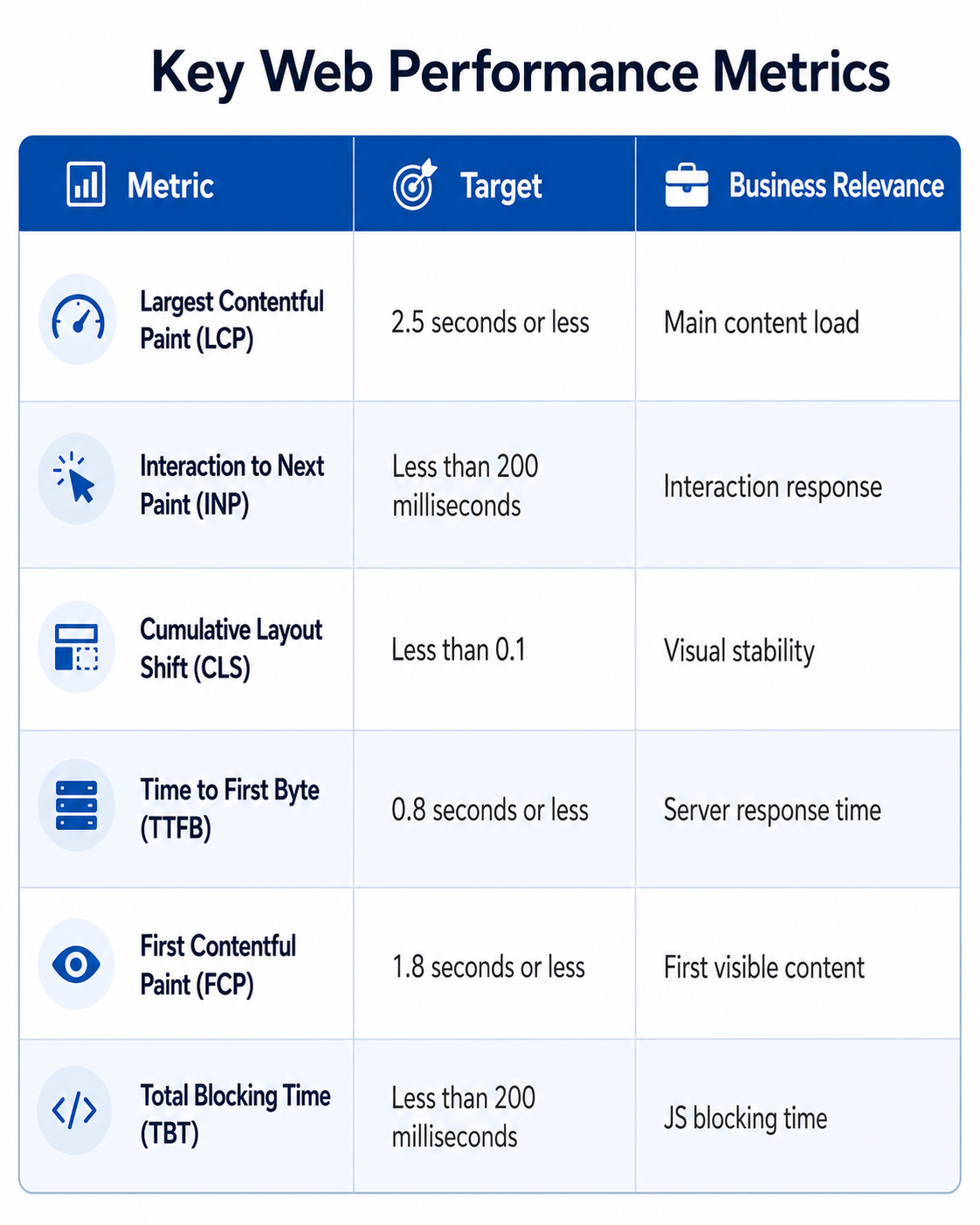
But when chasing speed, organizations often make the common mistake of limiting it to the homepage alone. Modern web innovation defines speed across the entire user journey, and a fast homepage attached to a slow checkout is still a slow business. Organizations should assess speed across these business-critical areas:
- Page rendering speed: How quickly does the main content become visible and usable?
- Interaction speed: How fast do menus, filters, buttons, forms, carts, pricing tools, and dashboards respond after a user action?
- Search and discovery speed: How quickly can users find products, services, locations, documents, support answers, or account information?
- Checkout and form speed: How much waiting, reloading, validation delays, and third-party friction are there before completion?
- API and server response speed: How quickly do pricing, inventory, authentication, personalization, recommendations, and transaction systems return data?
- Release speed without performance debt: How quickly can teams ship new features without slowing the experience over time?
 How AI Helps Build Fast Loading Websites?
1. Predictive Prefetching Based on User Behavior
Guess.js and Google’s machine-learning-based prefetching are used to analyze real user behavior, scroll patterns, click sequences, and time spent in each section to predict which page or asset a visitor is likely to need next.
2. Intelligent Image and Media Optimization
AI-driven image optimization platforms like Cloudinary, ImageKit, and Adobe’s Sensei automatically choose the right format (WebP, AVIF), compression level, and resolution for each user based on their device, network speed, and viewport size. This reduces image payload sizes, directly improving Largest Contentful Paint (LCP) scores.
3. Adaptive Content Delivery Through Smart CDNs
Modern CDNs like Cloudflare and Akamai use machine learning to analyze traffic patterns, detect congestion, and dynamically route requests through the fastest available path. These tools also predict which content should be cached at which edge location based on regional demand.
4. Automated Critical CSS and Above-the-Fold Optimization
AI tools can scan a page, identify the CSS rules required to render above-the-fold content, and inline only those critical styles, deferring the rest. This improves First Contentful Paint (FCP) and LCP without manual CSS auditing.
Some Quick Measures to Improve Web Page Speed
- Compress and resize images before uploading them
- Enable browser caching and server-side caching
- Reduce unused JavaScript, CSS, plugins, and third-party scripts
- Lazy-load non-critical images and videos
- Avoid lazy loading the main hero image
- Monitor Core Web Vitals regularly
- Use PageSpeed Insights, Lighthouse, Search Console, and WebPageTest for audits.
Pillar 2: Personalized User Experience is Now a Competitive Advantage
Netflix has set a new standard for website performance. The thumbnails, the row order, and even the artwork on individual titles adapt based on what you have watched. Netflix has reported that its personalized recommendation system saves the company over $1 billion per year in retained subscribers by reducing churn and improving content discovery. The level of personalized experience it provides resets what users expect from every website they visit afterward, including yours.
Why Generic Websites Now Create Business Drag?
A website that treats every visitor the same, regardless of intent, industry, behavior, location, or account history, usually fails. In 2026, 71% of consumers expect personalized interactions, while 76% feel frustrated when they do not receive them.
The impact becomes more expensive when paid campaigns are involved. Targeted ads may bring qualified visitors to the site, but one-size-fits-all landing pages often fail to carry that relevance forward. This can negatively impact lead quality and reduce the likelihood of repeat visits when returning users see the same experience every time.
What Personalization Actually Looks Like in 2026?
The biggest misconception is that personalization means “Hi {FirstName}” in an email and a recommended products carousel. Modern personalization is a full-site experience:
- Personalized homepage that adapts as per users’ previous engagement activity
- Dynamic product and service recommendations driven by real-time behavior
- Location-based offers, including local currency, regional compliance, and language
- Returning visitor journeys that pick up where the user left off, rather than restarting
- AI-driven search and content suggestions that understand the true intent
Why AI Has Changed the Economics of Personalization?
Until recently, this level of personalization was reserved for enterprises with seven-figure MarTech budgets. However, three shifts have changed that:
1. Behavioral Data Infrastructure Has Matured
Customer data platforms like Segment, Rudderstack, and mParticle unify visitor behavior across web, mobile, and product without custom engineering.
2. AI-Driven Personalization Has Become Accessible
Tools like Mutiny, Dynamic Yield, Optimizely, and Adobe Target, along with custom LLM integrations, let mid-sized organizations deploy real-time personalization without building models from scratch.
3. Edge Computing Has Solved the Website Speed Problem
Edge functions on Cloudflare, Vercel, and AWS Lambda@Edge run personalization logic close to the user, often adding only a few milliseconds to page load time.
Quick Tips to Implement Personalization
- Match CTAs to visitor intent and buying stage
- Align paid ad copy with landing page content
- Show returning users content based on past activity
- Localize pricing, language, offers, and compliance information
- Use AI search to understand intent, beyond just keyword matching
- Connect CRM, analytics, and website behavior data
- A/B test personalized experiences before scaling.
Pillar 3: Simplicity in Web Design is a New Performance Driver
It takes about 1/50th of a second for a visitor to decide if your website is worth their time. For decision-makers, it shows up where it hurts most: high bounce rates, wasted paid traffic, eroded customer trust, and even low conversion rates.
What Simplicity in Web Design Actually Means?
Simplicity in web design does not mean fewer features or a plain design. It means that every element on the page has a clear purpose, the layout guides users naturally toward their next action, distractions and dark patterns are removed. A simple site can still be content and feature-rich, as long as the user never has to work to easily figure out what to do next.
If simplicity in web design is implemented correctly, it becomes a direct driver of measurable business outcomes. The outcomes include better engagement because a clear hierarchy and intuitive navigation invite users to explore deeper rather than retreat. Alongside this, simplicity improves decision-making by reducing decision fatigue and strengthening trust, as well-structured sites signal credibility within the first few seconds.

Quick Tips to Design Smooth Web Experiences
Every interaction a visitor has with your website is shaped by UI decisions that either reduce friction or quietly add to it. Organizations that develop genuinely effortless web experiences treat UI as a collection of deliberate choices that build customer trust and drive conversion. The quick UI tips below cover how to apply each one in practice.
1. Mobile-First Design
With mobile traffic now accounting for 52.27% of global website traffic, website UI must be optimized for mobiles. To design mobile-first websites, keep:
- 44 x 44 px touch targets for comfortable tapping
- Critical actions reachable with one thumb
- Prioritize website performance optimization for slower mobile networks, since
- heavy desktop-first designs frequently collapse on mobile.
2. Eliminate Dark Patterns and Manipulative UI
Dark patterns deceive or trick users into actions they might not have intended. These are one of the fastest ways to lose customer trust in 2026. Beyond this, regulators across the EU, US, and India are now actively penalizing these practices under consumer protection laws. To design a compliant and trustworthy UI:
- Avoid pre-checked consent boxes, fake urgency timers, confusing cancellation flows, and guilt-based copy.
- Keep opt-outs simple, clearly display pricing, and make each action transparent.
3. Design Forms Carefully
Forms deserve disproportionate attention because they influence key conversion points, including lead capture, signup, checkout, and contact requests. To simplify form design, use:
- Visible field labels (placeholders), autofill, inline validation, and clear error messages
- Mark required fields clearly and remove non-essential fields.
4. Make Navigation Predictable
94% of users say easy navigation is the most important website feature. To make predictable navigation, use familiar menu patterns, keep placement consistent across pages, and label items the way users actually search for them.
- For example, “Pricing” should always say “Pricing,” never “Investment Options”
- Add breadcrumbs in deeper sections to keep users oriented
- Make search easily accessible on content-heavy sites.
5. Typography
Typography quietly carries more weight than almost any other UI choice, since text makes up the majority of most websites. To implement this properly,
- Keep the body copy between 16 and 18 pixels on desktop
- Line heights between 1.5 and 1.7 for comfortable reading
- Line length should sit between 50 and 75 characters
- Hierarchy should come from deliberate contrast in size, weight, and spacing
- A clear difference between headlines, subheadings, and body text for skimmable content
- Two font type families at most, one for headlines and one for body.
6. Thoughtful Use of Whitespaces
Visual hierarchy ensures the most important information is also the most visible through whitespace (or negative space). It is not empty space, but a design principle that gives content room to breathe and guides the user’s focus.
7. Use Color with Intent
The color palette must be chosen carefully and used consistently throughout the website to maintain brand consistency. To use colors properly, keep:
- One primary accent color for key actions, such as buttons and high-priority links
- Secondary colors for alerts, labels, and supporting elements
- Strong contrast to meet Web Content Accessibility Guidelines AA standards.
8. Standardize Components and Interaction States
Inconsistent UI forces users to relearn the system on every page, which quietly drains attention and trust. To standardize it, design deliberately:
- Buttons that look and behave the same across the site
- Forms that follow the same patterns
- Icons that carry the same meanings
- Hover states, active states, focus states, and disabled states.
Final Thoughts
In this blog, we have seen how moving beyond the conventional focus on technical architecture can impact website performance. The point is not that architecture has become less important; it is that architecture alone is no longer enough to deliver the intended performance and capture users’ attention in this saturated market.
Once the technical foundation is in place, the next question is whether the website can respond to what customers actually need because users these days do not have the patience for static web experiences. They expect relevant content and brand interactions that reflect their intent. This expectation is higher: 45% of Gen Z customers are likely to leave if the website doesn’t predict what they like, want, or need. This is why modern web development practices focus on building fast loading websites to offer a personalized user experience and implementing simple web design to make the next step easier.
For project heads, the takeaway is clear. These factors influence acquisition, engagement, lead quality, and conversion efficiency. The future of web development belongs to teams that treat speed, personalization, and simplicity as the core of efficient website development. That is where execution quality matters. Whether the goal is to rebuild an existing site or develop one from scratch, businesses must be thoughtful when designing online experiences. Working with an experienced web development service provider is a good way to ensure you avoid design issues and other inconsistencies from the very beginning, helping your website avoid avoidable limitations.
