

AI in UI/UX: How Intelligent Interfaces Are Redefining User Expectations
The best interface is no longer the one with the most polished layout or the most feature-rich screen. It is the one that removes effort before the user has to think about it. According to the Adobe 2025 AI & Digital Trends report, 78% of consumers expect a seamless experience across digital and physical channels, yet only 45% of brands meet that expectation.
Users no longer want interfaces that merely work. They expect products to anticipate intent, respond to context, and help them reach outcomes faster. AI is making that possible by shifting UI/UX away from fixed interactions and toward more adaptive, assistive experiences. It is no longer just an added feature layer, but an increasingly important part of how products reduce friction and shape the experience from the start.
How AI Has Changed What Users Expect From Interfaces
The broader impact of AI on UX design is that users now expect more than functional interfaces. AI in user experience is raising the standard by moving expectations beyond basic usability and making more context-aware interactions feel normal. AI has raised expectations by:
Going Beyond Basic Usability
For years, usability was enough. If a product was clear, consistent, and easy to navigate, it was considered well designed. That standard has shifted. Usability is now the minimum requirement, not the differentiator.
AI has changed this by making relevance, guidance, and speed feel normal across digital experiences. Users now interact with products every day that complete sentences, surface the next likely action, recommend content, summarize information, and reduce the effort needed to move forward. As those patterns become more common, users begin to expect the same level of assistance elsewhere.
The growing role of AI in user experience is not just about adding new features. It is about meeting a higher expectation for relevance and support without overwhelming the user.
Making Interactions More Context Aware
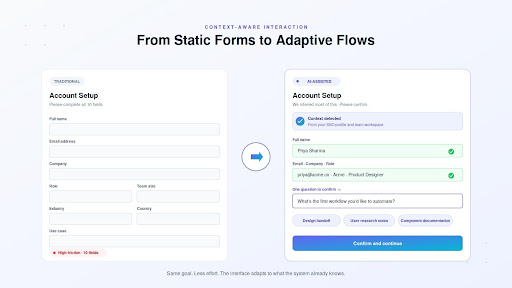
AI has also changed expectations by making users more accustomed to interfaces that respond to context rather than just direct input. Traditional patterns such as menus, forms, tabs, and navigation still matter because they provide structure and predictability. But users increasingly expect those patterns to be supported by interaction that feels more adaptive. A form with ten fields feels unnecessarily heavy when a system can infer part of the information from behavior, action history, or surrounding context. A static dashboard feels limited when users know an interface could explain a change, highlight an anomaly, or guide them to the next step in plain language.
This is where AI-based UI design is reshaping interaction. Instead of relying only on fixed paths, intelligent interfaces in UX design can introduce suggestions at the right moment, accept natural language input, and adjust the flow based on what the user is trying to accomplish. The shift is not that traditional UI is obsolete. It is that users increasingly expect the interface to respond with more awareness, less friction, and better timing.
What Good Intelligent UX Looks Like in Practice?
It is easy to add AI to a product. It is harder to make that intelligence feel useful in practice. An intelligent UX usually does three things well:
It Reduces Effort Without Adding Friction
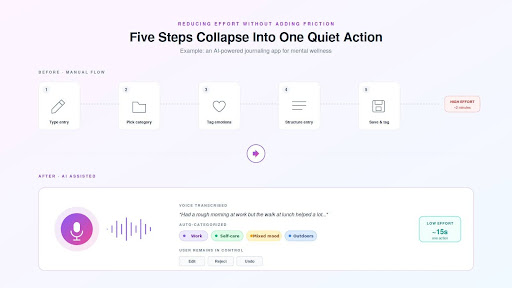
The clearest test of AI in UI/UX and product design is simple: does it remove work, or does it create more of it? Good intelligent interfaces reduce repetitive steps, simplify decisions, and help users move faster without making the product feel heavier. Poorly implemented AI does the opposite. It adds another layer to interpret, another suggestion to dismiss, and another system behavior to monitor.
That is why the value of AI in product design is not the model itself. It is the reduction in user effort. In practice, that can mean surfacing the next likely action, inferring missing inputs from context, or turning a multi-step task into a shorter, more guided flow.
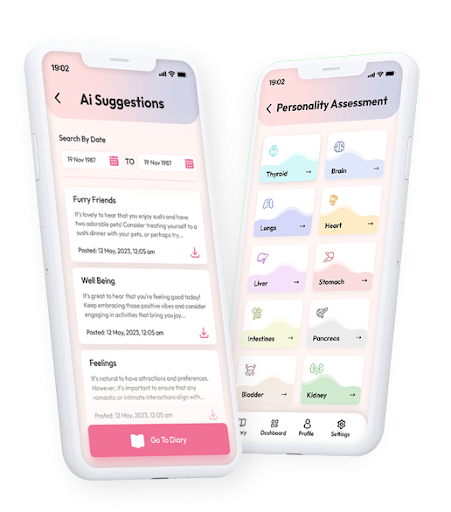
A good example of AI in app design is an AI-powered digital diary app designed for mental wellness. Instead of asking users to manually organize thoughts, label emotions, and structure entries, the product uses voice-to-text and automatic categorization to reduce the effort required to journal. The interface does not ask users to engage with the AI as a feature. It uses AI quietly to make the core action easier to complete. That is where intelligent UX becomes valuable: when the user feels the benefit without having to manage the complexity behind it.
It Gives Users Clarity, Control, and Recovery Options
Intelligence alone does not create confidence. When an interface predicts, suggests, or generates, users need to understand what happened and what they can do next. That means the experience must provide clarity around AI-generated outputs, control over what is accepted, and simple ways to recover when the system gets something wrong.
This is one of the most important differences between usable AI and frustrating AI. If the system makes a recommendation, the user should be able to review, edit, reject, or undo it without friction. If the output is uncertain, the interface should make that visible rather than presenting the result with false authority.
It should assist action, not take it over. Many AI-enabled interfaces fail not because the model is incapable, but because the product gives users no practical way to question, correct, or recover from the system’s behavior. In AI-based UI design, those recovery paths are not secondary details. They are central to trust.
It Builds Accessibility and Trust into the Experience
AI can make interfaces more responsive and supportive, but that does not reduce the importance of accessibility or trust. It increases it. The more adaptive a product becomes, the more carefully the experience has to communicate what it is doing, what data it is using, and how the user stays in control.
That is why strong, intelligent UX still depends on clear privacy communication, inclusive interaction patterns, and predictable behavior. Users should not have to guess how their data is being used or whether a recommendation is based on something sensitive. They should also not lose access to core functionality because the interface assumes one preferred way of interacting.
This is also where the broader benefits of AI in UX design become more concrete. Done well, AI-driven UX reduces cognitive load, supports different user needs, and makes digital products easier to use across varying abilities, contexts, and levels of confidence. But none of that happens automatically. It depends on UX decisions that keep the experience understandable, inclusive, and safe.
The digital diary project makes that point well. Personalized prompts and insights are useful only because the experience also communicates safety and control clearly. Security features such as encryption and GDPR-compliant consent handling are not buried in a policy document. They are part of how trust is built into the product experience itself. That design approach contributed to stronger engagement, improved emotional self-awareness, and high data security compliance. AI personalization works best when the interface feels supportive, not intrusive.
Conclusion
How AI is changing UI/UX design is not about making interfaces feel futuristic. It is about making them more helpful, responsive, and context-aware. That expectation affects how products are judged. Clean navigation and visual consistency still matter, but users increasingly notice when an interface requires them to do work the system could have reduced.
This is why intelligent UX cannot be measured by how much AI a product contains. It is measured by how naturally intelligence improves the experience. When AI reduces effort, supports better decision-making, and still provides users with clarity, control, and trust, it strengthens the product. When it adds confusion or removes control, it weakens it. The designer’s role is no longer limited to arranging screens. It now includes shaping how intelligence appears, behaves, and stays usable in practice.
FAQs
Is there a difference between AI UI design and AI UX design?
Yes. AI UI design focuses more on interface-level elements such as adaptive layouts, smart suggestions, conversational inputs, or AI-powered controls. AI UX design is broader. It covers the full experience, including user control, recovery when the system is wrong, trust, timing, and how intelligence fits into the journey as a whole.
How is AI in product design different from simply adding an AI feature?
AI in product design means designing the product around where intelligence meaningfully improves the experience. That is different from adding a single AI feature on top of an existing workflow. It involves deciding when AI should assist, what it should automate, how users stay in control, and how the product should behave when the output is uncertain.
What are the main benefits of AI in UX design?
The main benefits of AI in UX design include lower user effort, faster task completion, better contextual guidance, more relevant interactions, and stronger support for personalization at scale. When implemented well, AI can also reduce repetitive input, improve discoverability, and make digital products feel more responsive to user needs.
What makes an AI-driven user experience different from traditional personalization?
A traditional personalized experience usually depends on fixed rules, segments, or predefined logic. AI-driven user experience goes further by learning from behavior, context, and patterns in real time. It can adapt assistance, surface likely next steps, and adjust the experience more dynamically than static rule-based systems.
What is the future of UI UX with AI?
The future of UI UX with AI is less about dramatic interfaces and more about adaptive behavior. Products will increasingly respond to intent, reduce unnecessary steps, and support more natural interactions. At the same time, strong UX will still depend on clarity, accessibility, recovery paths, and user control. The products that succeed will be the ones where intelligence feels useful without becoming disruptive.
Where do user experience consulting services fit into AI-enabled product design?
User experience consulting services are useful when a business needs help deciding where AI should improve the experience and where it should not. This includes identifying the right use cases, defining user flows, shaping trust and recovery patterns, validating whether AI is actually reducing friction, and ensuring the final experience remains usable rather than overly automated.
