

Most AI Coding Assistants Have a Search Problem. Fix it with Code Context
AI coding tools are everywhere—and they’re exploding in popularity for good reason. From Claude Code and Gemini CLI to open-source alternatives like Cursor, these tools can generate functions, explain dependencies, and even refactor entire files with just a single prompt. Developers are racing to integrate them into their workflows, and in many cases, the results are impressive.
But there’s one place where most of these tools fall short: understanding your codebase. Just ask Claude Code something like “Where does this project handle user authentication?” and it defaults to grep -r “auth”, returning 87 loosely related matches across filenames, comments, and variable names, while missing the actual logic tucked away in functions that aren’t named “auth” at all.
That’s the real limitation in today’s AI dev tools: they lack true code context.
That is why we created Code Context, an open-source, MCP-compatible plugin that bridges this gap. It brings fast, semantic code search to any AI-powered coding environment—from Claude Code and Gemini CLI to IDEs like VSCode, and even the browser via Chrome.
In the rest of this post, we’ll show you exactly how Code Context works—and how you can start using it today.
Code Context: Open-Source Alternative to Cursor’s Intelligence
Code Context is an open-source, MCP-compatible semantic code search engine. Whether you’re building a custom AI coding assistant from scratch or adding semantic awareness to AI coding agents like Claude Code and Gemini CLI, Code Context is the engine that makes it possible.
It runs locally, integrates with your favorite tools and environments, such as VS Code and Chrome browsers, and delivers robust code understanding without relying on cloud-only, closed-source platforms.
Core capabilities include:
- Semantic Code Search via Natural Language: Find code using plain English. Search for concepts like “user login verification” or “payment processing logic,” and Code Context locates the relevant functions—even if they don’t match the keywords exactly.
- Multi-Language Support: Search seamlessly across 15+ programming languages, including JavaScript, Python, Java, and Go, with consistent semantic understanding across them all.
- AST-Based Code Chunking: Code is automatically split into logical units, such as functions and classes, using AST parsing, ensuring search results are complete, meaningful, and never cut off mid-function.
- Live, Incremental Indexing: Code changes are indexed in real time. As you edit files, the search index stays up to date—no need for manual refreshes or re-indexing.
- Fully Local, Secure Deployment: Run everything on your own infrastructure. Code Context supports local models via Ollama and indexing via Milvus, so your code never leaves your environment.
- First-Class IDE Integration: The VSCode extension lets you search and jump to results instantly—right from your editor, with zero context switching.
- MCP Protocol Support: Code Context speaks MCP, making it easy to integrate with AI coding assistants and bring semantic search directly into their workflows.
- Browser Plugin Support: Search repositories directly from GitHub in your browser—no tabs, no copy-pasting, just instant context wherever you’re working.
How Code Context Works

Code Context uses a modular architecture with a core orchestrator and specialized components for embedding, parsing, storage, and retrieval.
The Core Module: Code Context Core
At the heart of Code Context is the Code Context Core, which coordinates code parsing, embedding, storage, and semantic retrieval:
- Text Processing Module splits and parses code using Tree-sitter for language-aware AST analysis.
- Embedding Interface supports pluggable backends—currently OpenAI and VoyageAI—converting code chunks into vector embeddings that capture their semantic meaning and contextual relationships.
- The Vector Database Interface stores these embeddings in a self-hosted Milvus instance (by default) or in Zilliz Cloud, the managed version of Milvus.
All of this is synchronized with your file system on a scheduled basis, ensuring the index stays up to date without requiring manual intervention.
Extension Modules on top of Code Context Core
- VSCode Extension: Seamless IDE integration for fast in-editor semantic search and jump-to-definition.
- Chrome Extension: Inline semantic code search while browsing GitHub repositories—no need to switch tabs.
- MCP Server: Exposes Code Context to any AI coding assistants via the MCP protocol.
Why Use Code Context?
The basic setup gets you running quickly, but where Code Context truly shines is in professional, high-performance development environments. Its advanced features are designed to support serious workflows, from enterprise-scale deployments to custom AI tooling.
Run It Fully Offline — With Enterprise-Grade Security
Code Context can run completely offline. It uses local tools—like the Ollama embedding model and Milvus vector database—so there are no API calls, no internet required, and no data ever leaves your machine.
This setup is perfect for companies in high-security industries like finance, government, or defense, where keeping code private isn’t optional—it’s mandatory.
Always Up to Date — Without Slowing You Down
Your code changes fast, and your search tool should keep up. Code Context includes a smart file watcher that instantly sees when something changes and only re-indexes the files that actually changed.
That means updates happen in seconds, not minutes, and there’s no need to click “refresh.” The code you just wrote is already searchable.
In fast-paced development, that kind of speed makes a big difference.
Smarter Code Understanding with Structural Parsing
Traditional code search tools often split code by lines or character limits—breaking apart functions or classes and returning messy, incomplete results.
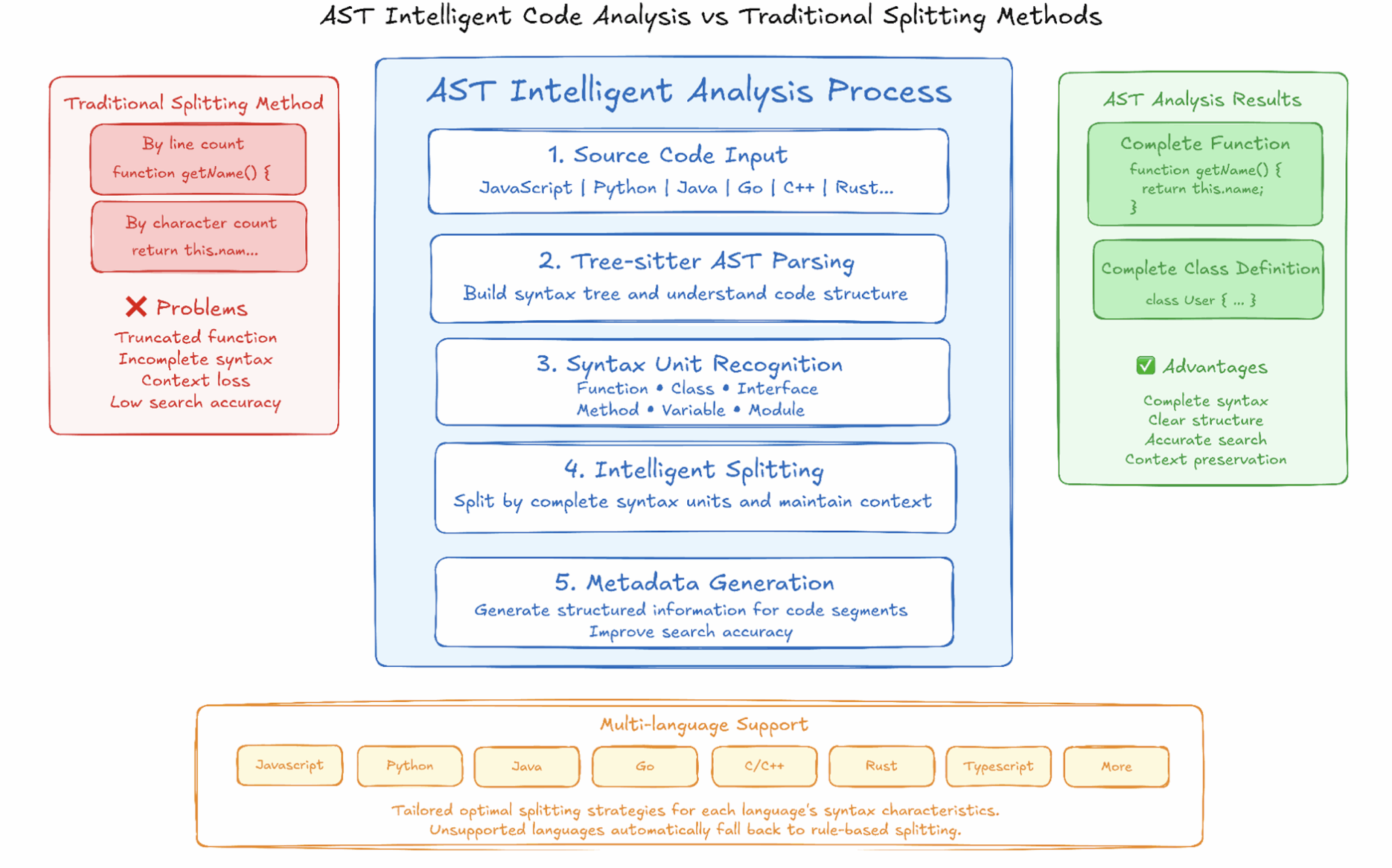
Code Context takes a better approach. It uses Tree-sitter to parse your code’s actual structure, identifying full functions, classes, interfaces, and modules. That means you get clean, meaningful chunks—not random slices of code.
It supports popular languages like JavaScript, TypeScript, Python, Java, C/C++, Go, and Rust, with language-specific strategies for accurate parsing. For other languages, it falls back to rule-based methods, so you still get reliable results—no crashes, no blank screens.
These structured chunks also power more accurate semantic search by providing rich metadata tied to real code units. The result: smarter, more relevant search every time.
Open Source and Built to Be Extended
Code Context is fully open source under the MIT license, with all core modules available on GitHub. We believe developer tools should be transparent, customizable, and community-driven. That’s why we’ve made it easy to extend—whether you’re adding support for new models, programming languages, or use cases.
Solving the AI Context Window Problem
AI coding assistants, like Claude Code and Gemini CLI, are limited by the size of their context window. That means they can’t “see” your whole codebase—which leads to less accurate completions, suggestions, and bug fixes.
Code Context helps fill in the gaps. Its semantic code search finds the most relevant pieces of your code and feeds them to the model—so it focuses only on what matters. The result? Smarter, more useful AI responses.
Most AI tools still rely on basic keyword searches. When you integrate Code Context via MCP, you give them a major upgrade—with real understanding of your code, not just guesswork.
Built for Developers, by Developers
Code Context is packaged for modular reuse: each component is available as an independent npm package. You can mix, match, and extend as needed for your project.
- Need only a semantic code search? Use@zilliz/code-context-core
- Want to plug into an AI agent? Add @zilliz/code-context-mcp
- Building your own IDE/browser tool? Fork our VSCode and Chrome extension examples
Some example applications of code context:
- Context-aware autocomplete plugins that pull relevant snippets for better LLM completions
- Intelligent bug detectors that gather surrounding code to improve fix suggestions
- Safe code refactoring tools that find semantically related locations automatically
- Architecture visualizers that build diagrams from semantic code relationships
- Smarter code review assistants that surface historical implementations during PR reviews
Final Thoughts
Welcome to Join Our Community
Code Context is more than just a tool—it’s a platform for exploring how AI and vector databases can work together to truly understand code. As AI-assisted development becomes the norm, we believe semantic code search will be a foundational capability.
We welcome contributions of all kinds:
- Support for new languages
- New embedding model backends
- Innovative AI-assisted workflows
- Feedback, bug reports, and design ideas
Together, we can build the infrastructure for the next generation of AI development tools—transparent, powerful, and developer-first.
